Whirlpool WGE745C0FS - Mode d'emploi
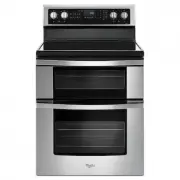
Cuisinière Whirlpool WGE745C0FS - Mode d'emploi, à lire gratuitement en ligne au format PDF. Nous espérons que cela vous aidera à résoudre toutes les questions que vous pourriez avoir. Si vous avez encore des questions, contactez-nous via le formulaire de contact.

10
Languages - Scrolling Display Text
Language options are English, Spanish and French.
1.
Press SETTINGS until “LANGUAGE” is displayed.
2.
The current setting will be displayed.
3.
Press the number keypad to adjust the setting.
4.
Press CANCEL UPPER or CANCEL LOWER to exit and
display the time of day.
Oven Temperature Offset Control
IMPORTANT:
Do not use a thermometer to measure oven
temperature. Elements will cycle on and off as needed to provide
consistent temperature, but they may run slightly hot or cool at
any point in time due to this cycling. Most thermometers are slow
to react to temperature change and will not provide an accurate
reading due to this cycling.
The oven provides accurate temperatures; however, it may cook
faster or slower than your previous oven, so the temperature can
be adjusted to personalize it for your cooking needs. It can be
changed in Fahrenheit or Celsius.
To Adjust Oven Temperature:
1.
Press SETTINGS until “TEMP CALIB” is displayed.
2.
The current setting will be displayed. Press the “1” keypad
to toggle between the upper and lower ovens.
3.
Press START UPPER or START LOWER to select the choice
displayed in Step 2. Wait 10 seconds for the display to change
or press START UPPER or START LOWER, and then continue
with Step 4.
4.
Press the “3” keypad to increase the temperature in 5°F
(3°C) increments, or press the “6” keypad to decrease the
temperature in 5°F (3°C) increments. The range is from -30°F
to +30°F (-18°C to +18°C).
5.
Press START UPPER or START LOWER.
6.
Press CANCEL UPPER or CANCEL LOWER to exit and
display the time of day.
Demo Mode
IMPORTANT:
This feature is intended for use on the sales floor
with 120 V power connection and permits the control features
to be demonstrated without the oven turning on. If this feature
is activated, the oven will not heat.
1.
Press SETTINGS until “DEMO MODE” is displayed.
2.
The current setting will be displayed.
3.
Press the “1” keypad to adjust the setting.
4.
Press CANCEL UPPER or CANCEL LOWER to exit and
display the time of day.
Energy Save
The Energy Save mode deactivates the display to reduce energy
consumption. The setting will be activated after being idle for
several minutes. Any mode may be used with the range in Energy
Save by selecting the desired mode.
1.
Press SETTINGS until “ENERGY SAVE” is displayed.
2.
The current setting will be displayed.
3.
Press the “1” keypad to adjust the setting.
4.
Press CANCEL UPPER or CANCEL LOWER to exit and
display the time of day.
Keep Warm
IMPORTANT:
Food must be at serving temperature before placing
it in the warmed oven. Food may be held up to 1 hour; however,
breads and casseroles may become too dry if left in the oven
during the Keep Warm function. For best results, cover food.
The Keep Warm feature allows hot cooked foods to stay at
serving temperature.
To Use:
1.
Press KEEP WARM for the desired oven.
2.
Press the number keypads to set the desired temperature. If
the temperature entered is not in the range of the temperatures
allowed, the minimum or maximum allowed temperature will
be displayed. Enter a temperature in the allowable range.
NOTE:
When cooking in a single oven, the temperature may
be changed at any time by pressing the number keypads to
enter the desired temperature, and then press START for the
selected oven.
When cooking in both ovens, press any number on the
keypad, then follow the on-screen prompts to select the
desired oven. Press the number keypads to enter the desired
temperature, and then press START for the selected oven.
3.
Press START for the selected oven.
4.
Place food in the oven.
5.
Press CANCEL for the selected oven when finished.
6.
Remove food from the oven.
To Cancel Keep Warm:
1.
Press CANCEL for the selected oven.
2.
Remove food from oven.
Sabbath Mode
The Sabbath mode sets the oven to remain on in a bake setting
until turned off.
When the Sabbath mode is set, only the Bake cycle will operate.
All other cooking and cleaning cycles are disabled. No tones will
sound and the displays will not indicate temperature changes.
When the oven door is opened or closed, the oven light will
not turn on or off and the oven heating elements will not turn on
or off immediately.
To Enable Sabbath Mode Capability (one time only):
1.
Press SETTINGS until “SABBATH” is displayed.
2.
Press the “1” keypad. Sabbath mode can be activated for
baking.
3.
Press CANCEL UPPER or CANCEL LOWER to save the setting
and exit to display the time of day.
NOTE:
To disable the Sabbath mode, repeat steps 1 through 3
to change the status from “SABBATH ON” to “SABBATH OFF.”
To Activate Sabbath Mode:
1.
Press BAKE for the desired oven.
2.
Press the number keypads to set the desired temperature. If
the temperature entered is not in the range of the temperatures
allowed, the minimum or maximum allowed temperature will
be displayed. Enter a temperature in the allowable range.
3.
Press START for the selected oven.
For timed cooking in Sabbath mode, press COOK TIME, and
then press the number keypads to set the desired cook time.
Press START for the selected oven.
WARNING
Food Poisoning Hazard
Do not let food sit in oven more than one hour before
or after cooking.
Doing so can result in food poisoning or sickness.
« Chargement du manuel » signifie que vous devez attendre que le fichier soit complètement chargé avant de pouvoir le lire en ligne. Certains manuels sont très volumineux, et le temps de chargement dépend de la vitesse de votre connexion Internet.
Ce manuel vous a-t-il été utile ?
À propos de ce manuel
- Marque
- Whirlpool
- Modèle
- WGE745C0FS
- Type de document
- Mode d'emploi
- Catégorie
- Cuisinière
- Langue(s)
- Anglais, Français
- Pages
- 23
- Taille du fichier
- 1,1 MB
- Format
Poser une question
Manuels associés
Plus de modèles cuisinières Whirlpool
 Mode d'emploi Whirlpool WFG505M0BS
 Mode d'emploi Whirlpool WFG525S0JS
 Notice d'Installation Whirlpool WFG525S0JW
 Mode d'emploi Whirlpool WFG525S0JZ
 Mode d'emploi Whirlpool WFG535S0LS
 Mode d'emploi Whirlpool WFG550S0LZ
 Mode d'emploi Whirlpool WGG745S0FS
 Notice d'Installation Whirlpool WEE510S0FS
 Mode d'emploi Whirlpool WEE745H0LZ
 Mode d'emploi Whirlpool WEE750H0HZ
 Mode d'emploi Whirlpool WEG515S0LS
 Mode d'emploi Whirlpool WEG745H0LZ
 Mode d'emploi Whirlpool WEG750H0HZ
 Mode d'emploi Whirlpool WFC150M0JB
 Mode d'emploi Whirlpool WFC150M0JS
 Mode d'emploi Whirlpool WFC150M0JW
 Mode d'emploi Whirlpool WFC315S0JS
 Mode d'emploi Whirlpool WFC315S0JW
 Mode d'emploi Whirlpool WFE320M0JS
 Mode d'emploi Whirlpool WFE500M4HS